

This article was translated by AI from the Chinese version.
A Little Rambling
In my previous post, from late September, I ran into a problem while using localStorage in Nuxt. At first I thought my code design was wrong, but it turned out to be a hydration problem that needs to be avoided.
I wanted to write about it then. Real life was busy, my knowledge was limited, and SSR is deep water. I needed to do quite a lot of research before I could write even a short post, so it took me until now.
At first, I thought I only needed to explain hydration and list a few situations that trigger hydration issues. But hydration is shared by SSR (Server-Side Rendering) and SSG (Static Site Generation), so I also had to understand SSR and SSG. To understand them, I first had to understand rendering patterns in general. You can see why this got delayed.
Please forgive me for taking so long to finish such a short article.
That said, I realized that I have already worked with three projects involving SSR, including this blog. Astro uses island rendering, and I have modified parts of this blog as well. Maybe that gives me enough confidence to write about it.
Introducing the Ideas
The knowledge builds layer by layer: first rendering patterns, then SSR, then hydration.
It is a long road, so I will begin with a broad explanation of a few key terms: rendering patterns and SSR. Then I will use simple examples to build an intuitive understanding of SSR and hydration, including a few straightforward SSR errors. A deeper discussion can wait for later.
Start with Rendering
Rendering is the process that turns the usual front-end trio of HTML, CSS, and JavaScript into an actual page. I do not completely master the theory, so here is an explanation image from Gemini. The main thing to understand is that rendering takes time and has a cost. That is why different rendering patterns exist.
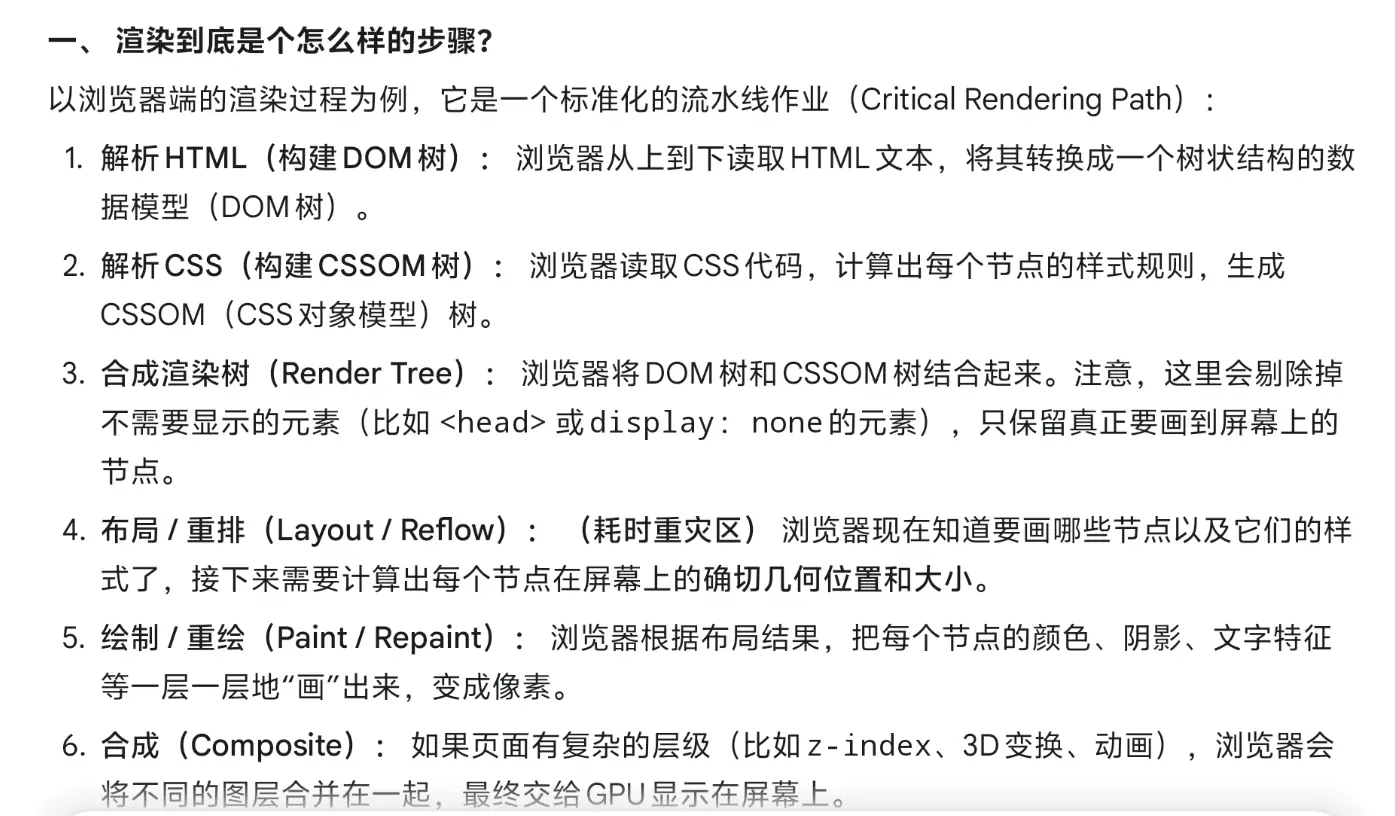
SSR means Server-Side Rendering. A rendering pattern describes how the browser turns front-end code into a web page. Here are two patterns that you have probably used even if you did not know their names.
Static Rendering
If you write a Hello.html file and serve it directly, that is a static website. Nothing special happens: the browser receives Hello.html and renders it.
If you want multiple pages, you access different files in the URL, such as /page1.html and /page2.html.
Client-Side Rendering
If you create a new Vue project with npm create vue@latest, its default pattern is CSR, or Client-Side Rendering.
In a CSR project, the server initially returns an almost empty HTML shell. JavaScript later generates the content inside that shell. Vue, for example, starts with <div id="app"></div>. Your .vue files use JavaScript to mount content into that app element. In this model, the JavaScript and final HTML are produced together in the browser.
Server-Side Rendering
Now we can get to the main topic: SSR.
People who customize their blogs may already know that blogs often use SSR. Hexo is purely static, for comparison. In SSR, the server renders a page into a complete HTML string before sending it to the browser. JavaScript is then attached to that already-rendered HTML, which effectively takes over the existing DOM nodes.
In a CSR blog, the server sends the user an empty shell, and the browser runs the downloaded JavaScript to fill it. With SSR, the server sends the complete pre-rendered blog homepage as an HTML file with content already inside it. The user does not have to wait for the browser to render the initial content.
That is why first-screen loading can be fast. In a food analogy, SSR gives you a prepared meal, while CSR still has to cook it after delivery.
Before Step One: Rendering on the Server
From the user’s perspective this is not really the first step, because the server often prepares the HTML and JavaScript before the user arrives. The client only waits to receive them.
It is important that HTML and JavaScript are separate here. As I said above, JavaScript will be attached later through client hydration.
The server environment and the browser environment are different. Unlike CSR, SSR evaluates some application code on the server. That difference is the reason SSR code can easily produce certain errors, which I will show later.
Step One: Get the Static Files
The client receives the HTML and JavaScript files prepared by the server and uses the HTML to fill the browser page. The user quickly sees a static page, which is one of SSR’s core advantages.
The JavaScript file has not done its job yet. It matters in the next step.
Step Two: Client Hydration
This is SSR’s most distinctive and difficult-to-understand step. The JavaScript file that was not used in step one needs to be connected to the HTML that is already displaying a static page. Only after they are connected do we have a complete, interactive front-end page.
For example, imagine a login page. The server HTML can show a login button, but without JavaScript it is only an empty shell and cannot log anyone in. We need to attach @click="login()" and the login function itself. Connecting those pieces of JavaScript to the matching HTML elements is called hydration.
In short, hydration reconnects the HTML and JavaScript that should have been one page, but were separated during the server-rendering stage.
Step Three: Normal Client-Side Operation
After hydration, the complete front end runs in the browser normally, just like a CSR application.
Common Problems
Here are a few problems that can happen when using SSR.
localStorage Cannot Be Used on the Server
Assume a browser has a localStorage entry named API_KEY:
<script setup lang="ts">const key = localStorage.getItem("API_KEY");</script>Will this work during SSR? No. You will get an error like this:
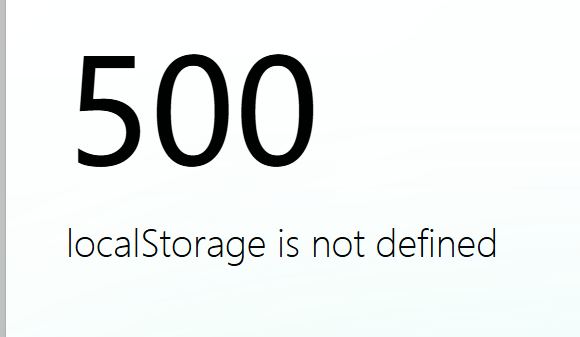
The problem happens in the pre-rendering step: the server does not have the localStorage API. It is a browser API for browser storage.
Moving the code into an imported helper does not solve it either:
import { getKey } from "~/use-key.ts";
const key = getKey();
export const getKey = () => { const key = localStorage.getItem("API_KEY"); return key;};An import is still evaluated during server rendering, so it can still call browser-only APIs.
The basic safe shape is to access it only after mounting in the browser:
function getKey() { return localStorage.getItem("API_KEY");}
onMounted(() => { getKey();});onMounted runs in step three, after the page has mounted in the client. That is why this version does not try to use localStorage on the server.
Some Requests Should Not Run on the Server
It is common to write logic like “send a request when entering this page.” But some requests should not be sent during SSR.
For example, a request may require user-submitted data or authentication information such as a token. When server rendering runs, that user-specific browser state is not available, so sending the request is meaningless.
Nuxt provides <client-only> for this kind of situation:
<client-only> <!-- Content --></client-only>You can wrap the part that sends the request in a component and put it inside <client-only>. It only renders during normal client-side operation, so the server does not make that request.
Errors During Client Hydration
The example I wrote about in the previous post is a hydration problem. It is complicated enough that it deserved its own article.
Although that post is dated September, I rewrote its core solution after finishing this SSR Part 1, and revised the rest as well. You can read it here:
Closing Thoughts
There are still many things I want to write about, including this mysterious pattern from my Astro blog:
---// This component is called ConfigCarrier.astro. It is mounted in layout.astro,// which means it exists on every page.import { siteConfig } from "../config";---
<div id="config-carrier" data-hue={siteConfig.themeColor.hue} data-lightDarkMode={siteConfig.lightDarkMode.defaultMode}></div>The config file contains this blog’s settings, and siteConfig is the exported constant that stores them. Other files read this component with DOM operations to obtain the configuration values.
Why not simply import siteConfig wherever it is needed?
My current understanding is that the config file is not sent to the client as part of SSR, so it cannot simply be imported there.
I will research this further. If that guess is wrong, I will not silently edit this article; I will explain it properly in the next SSR post.
For now, time and length make this a good place to stop. I hope you will see SSR Part 2 soon.
References
Video: 10 Rendering Patterns for Web Apps - the categories are broad, but it covers a lot.
Article: Understanding Hydration in React applications (SSR)
Bing search, ChatGPT, my project code, and my own brain.